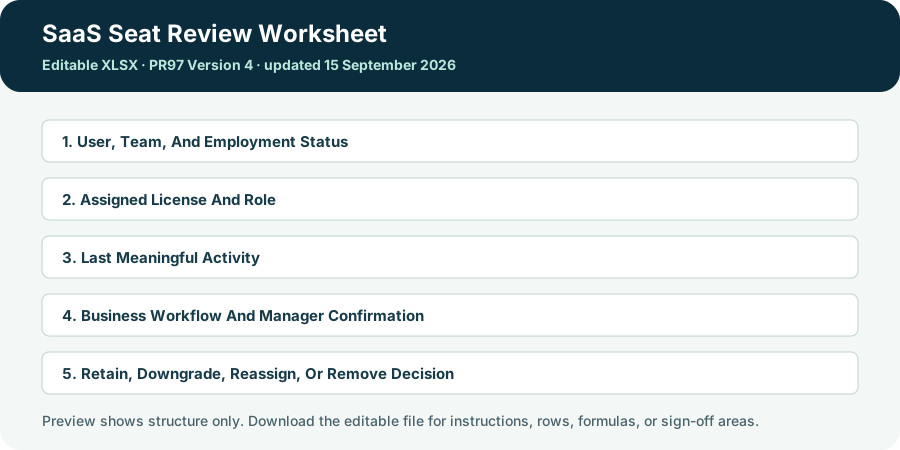
This file helps a buyer retain, downgrade, reassign, or remove each paid seat using evidence instead of last-login alone. It does not make the decision automatically; named reviewers must attach evidence, resolve mandatory gaps, and sign the final record.
For SaaS Seat Review Worksheet, this requirement applies: 1 worksheet(s): Working File; working range up to 24 rows by 9 columns; 20 formula cells; 2 data-validation rule(s). File size: 5,245 bytes. Counts describe the packaged file and are not marketing estimates.
What is inside the download
| # | Working area | Completion standard |
|---|---|---|
| 1 | User, Team, And Employment Status | Name an accountable person or role, define the decision or action they own, and state how completion will be confirmed. |
| 2 | Assigned License And Role | Name an accountable person or role, define the decision or action they own, and state how completion will be confirmed. |
| 3 | Last Meaningful Activity | Record the specific fact, its dated source, accountable owner, current status, and consequence if it remains unresolved. |
| 4 | Business Workflow And Manager Confirmation | Record the specific fact, its dated source, accountable owner, current status, and consequence if it remains unresolved. |
| 5 | Retain, Downgrade, Reassign, Or Remove Decision | Use a defined scale or status, cite the evidence, record dissent or conditions, and assign the next action and date. |
| 6 | Owner, Action Date, And Estimated Annual Change | Use an exact date, source, timezone or notice rule where relevant; assign the person who must act before it. |
Worked example
A user logged in yesterday but only viewed a dashboard that can be shared through a lower-cost role. The worksheet combines activity, required workflow, employment status, manager confirmation, and license capability before recommending a downgrade rather than an automatic retain decision.
For this SaaS Seat Review Worksheet review, use this evidence rule: the example shows the level of specificity expected; replace it with the buyer's own users, volumes, dates, evidence, commercial terms, and acceptance authority. Do not copy an example into an approval record as if it were observed evidence.
Review timing
Run it 90 to 120 days before renewal and after reorganizations, contractor exits, or license-policy changes.
Failure modes this template is designed to expose
- Equating login with meaningful use
- Deleting access before confirming data ownership
- Ignoring premium features used by a small cohort
- Failing to assign and verify remediation actions
Completion sequence for this file
- Set the boundary: agree User, Team, And Employment Status and Assigned License And Role before collecting detailed answers.
- Reconcile the record: test Last Meaningful Activity against Business Workflow And Manager Confirmation; preserve the source and explain conflicts.
- Close or escalate: use Retain, Downgrade, Reassign, Or Remove Decision and Owner, Action Date, And Estimated Annual Change to record the final action, authority, evidence, and next review.
Field-level Decision comments for this file
For SaaS Seat Review Worksheet, this requirement applies: the six working areas below are connected. Reviewers should reconcile them rather than complete each cell in isolation.
User, Team, And Employment Status
Begin this check with User, Team, And Employment Status. For the SaaS Seat Review Worksheet, reliable support normally includes a named accountable role, its authority, the population in scope, and the record that confirms action. Cross-check the result against Assigned License And Role, because a mismatch can change whether the file supports the decision to retain, downgrade, reassign, or remove each paid seat using evidence instead of last-login alone. Return the entry to its owner when it relies on assigning a department instead of a person or omitting guests, contractors, privileged users, and shared accounts. A reviewer should be able to reproduce the conclusion without attending the original meeting.
Assigned License And Role
The next control point is Assigned License And Role. For the SaaS Seat Review Worksheet, reliable support normally includes a named accountable role, its authority, the population in scope, and the record that confirms action. Cross-check the result against Last Meaningful Activity, because a mismatch can change whether the file supports the decision to retain, downgrade, reassign, or remove each paid seat using evidence instead of last-login alone. Return the entry to its owner when it relies on assigning a department instead of a person or omitting guests, contractors, privileged users, and shared accounts. If the source changes, update the entry and state whether the decision changes with it.
Last Meaningful Activity
Treat as decision evidence Last Meaningful Activity. For the SaaS Seat Review Worksheet, reliable support normally includes a dated primary record, accountable owner, review status, business consequence, and the proof required for closure. Cross-check the result against Business Workflow And Manager Confirmation, because a mismatch can change whether the file supports the decision to retain, downgrade, reassign, or remove each paid seat using evidence instead of last-login alone. Return the entry to its owner when it relies on an unlabeled assumption, copied answer, or blank cell that another reviewer might mistake for confirmation. Where proof is incomplete, preserve a conservative assumption and a dated closure action.
Business Workflow And Manager Confirmation
Before sign-off, challenge Business Workflow And Manager Confirmation. For the SaaS Seat Review Worksheet, reliable support normally includes a dated primary record, accountable owner, review status, business consequence, and the proof required for closure. Cross-check the result against Retain, Downgrade, Reassign, Or Remove Decision, because a mismatch can change whether the file supports the decision to retain, downgrade, reassign, or remove each paid seat using evidence instead of last-login alone. Return the entry to its owner when it relies on an unlabeled assumption, copied answer, or blank cell that another reviewer might mistake for confirmation. Any accepted limitation needs a named authority, business consequence, and next review date.
Retain, Downgrade, Reassign, Or Remove Decision
Use an independent review of Retain, Downgrade, Reassign, Or Remove Decision. For the SaaS Seat Review Worksheet, reliable support normally includes a defined scale, dated supporting evidence, reviewer identity, dissent or condition, next action, and approval authority. Cross-check the result against Owner, Action Date, And Estimated Annual Change, because a mismatch can change whether the file supports the decision to retain, downgrade, reassign, or remove each paid seat using evidence instead of last-login alone. Return the entry to its owner when it relies on an average score or completed status that hides a failed mandatory gate or an unresolved dependency. The completed entry should survive renewal, incident, audit, or replacement review.
Owner, Action Date, And Estimated Annual Change
Close the record only after reviewing Owner, Action Date, And Estimated Annual Change. For the SaaS Seat Review Worksheet, reliable support normally includes the governing contract, approved project plan, timezone, notice method, and accountable calendar owner. Cross-check the result against User, Team, And Employment Status, because a mismatch can change whether the file supports the decision to retain, downgrade, reassign, or remove each paid seat using evidence instead of last-login alone. Return the entry to its owner when it relies on confusing a term-end date with the last safe action date or treating an aspirational milestone as committed. Do not mark this area complete until its contradiction with the connected field is resolved.
Approval questions specific to the SaaS Seat Review Worksheet
- User, Team, And Employment Status: What would independently confirm this entry, and what happens to the decision if the only available support is assigning a department instead of a person or omitting guests, contractors, privileged users, and shared accounts?
- Assigned License And Role: What would independently confirm this entry, and what happens to the decision if the only available support is assigning a department instead of a person or omitting guests, contractors, privileged users, and shared accounts?
- Last Meaningful Activity: What would independently confirm this entry, and what happens to the decision if the only available support is an unlabeled assumption, copied answer, or blank cell that another reviewer might mistake for confirmation?
- Business Workflow And Manager Confirmation: What would independently confirm this entry, and what happens to the decision if the only available support is an unlabeled assumption, copied answer, or blank cell that another reviewer might mistake for confirmation?
- Retain, Downgrade, Reassign, Or Remove Decision: What would independently confirm this entry, and what happens to the decision if the only available support is an average score or completed status that hides a failed mandatory gate or an unresolved dependency?
Final challenge: Could software owners, finance analysts, IT administrators, and line managers preparing a true-down or renewal explain the decision, reproduce its key calculation or control, and identify the next action from this file alone? If not, the record is not ready for approval.